Learning JavaScript, Day 21 – Objects
I like how I was all "I am so productive, look at me go! So productive!" and then the heat wave and the thunderstorms last night and this current cold decided to all wage war on me in one gigantic battle and I ended up being very "oh no so tired so very tired".
I am wiped out, y'all. But I can, at least, get through the basics of JavaScript Objects. I can't promise I'll understand it, but, y'know, I can do a little.
Objects
Right off the bat, in the Step 1 about Objects:
If you understand objects, you understand JavaScript.
Ruh-roh Rhaggy.
No, okay, I will understand what the hell they mean.
I have six steps to get through in order to do the Beginner-level Objects:
- JavaScript Objects
- Object Properties
- Object Methods
- Object this
- Object Display
- Object Constructions
If I went through the Advanced section, I'd also have:
- Object Definitions
- Object this
- Object Iterations
- Object Get & Set
- Object Management
- Object Protection
- Object Prototypes
- Object Reference
But, thankfully, I'm not going through the Advanced section just yet. I have the basics to work through.
Javascript Objects
So objects are the variables that store the values and functions. Values are stored in properties, where there's a key and then the value. Functions are stored in methods, where there's a key and then the function.
They then use a car as an example, but I don't like cars, so I'm going to use something else. Some yarn I bought last week.
Object: Yarn
The yarn is the object. And there are values in the object and functions in the object.
Values are stored in properties, where there's the key and then the value.
yarn.amount = 100g
yarn.colour = Loen
yarn.shade = 4557
yarn.name = Fjord
yarn.weight = DK
yarn.type = Acrylic
Different yarn will have the same properties, but the values can be different. There could be 50g sock wool. There could be 200g chunky cotton. Whatever.
Functions are stored in methods, where there's the key and then the function.
yarn.ball()
yarn.skein()
yarn.knit()
yarn.crochet()
yarn.tangle()
With all yarn, you have the same methods, you can do all of these things with the yarn, but you can also do it at different times. Sometimes you do yarn.skein(), then yarn.ball(), then yarn.knit(). Sometimes you have yarn.skein() and then yarn.tangle().
Object Properties
So, when you create an object, you can put all the values and functions in.
const yarn = {
	amount:"100g",
	colour:"Loen",
	shade:"4557",
	weight:"DK",
	type:"Acrylic"
}
And then call what you want from that object.
document.getElementById("demo").innerHTML =
"This yarn is made from " + yarn.type;
This yarn is made from Acrylic
And when you throw everything into a single const with curly brackets, that's an object literal. You don't have to include spaces or line breaks, just as long as you have the , to break up the properties.
So I could do
const yarn =
{amount:"100g",colour:"Loen",shade:"4557",weight:"DK",type:"Acrylic"}
But that's hard to read. So I'm going to do the line breaks and indents.
You can also create the object and then put the properties in later, which would be helpful when you have the user input the properties.
So I can go
const yarn = {};

yarn.amount = "100g";
yarn.colour = "Loen";
yarn.shade = "4557";
yarn.weight = "DK";
yarn.type = "Acrylic";
You have to declare objects with const. No let here.
You can also apparently do something like
const yarn = new Object({
	amount: "100g";
});
But that's even more fiddly, so, yeah, no.
You can also call the properties by using dots, like yarn.amount or by brackets, like yarn["amount"]. I'm not sure why you would do brackets, it just seems like more work, but, okay, whatever.
Object Methods
You can also store functions in objects, a lot like storing values.
So, in this case, let's say I wanted to have all the yarn properties in place, but I also wanted to provide a nice clean one-line value.
const yarn = {
	amount:"100g",
	colour: "Loen",
	shade:"4557",
	weight:"DK",
	type:"Acrylic",
	name:"Fjord",
	brand:"King Cole",
	line: function() {
	return this.brand + " " + this.name + " " +
	this.amount + " " + this.type + " " + this.weight +
	" in " + this.colour " ("+ this.shade + ").";
	}
};
document.getElementById("demo").innerHTML = yarn.line();
Which gives me
King Cole Fjord 100g Acrylic DK in Loen (4557).
Which, by the way is this:
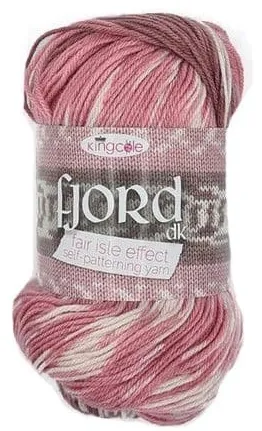
So I can also have other functions that can call separate properties (like if I wanted to just know what weight it was), but I also have my handy little one-liner for when I want to, say, list it on an inventory sheet.
And when I use this, it refers to the object it's in. So this.amount refers to the amount I specified just above.
Day 21 — Results
- Objects are variables that store values and functions.
- You write objects by using
const OBJECTNAME {}. - Values are stored in properties, where there's the key and then the value.
- Properties are written in the object like
VALUENAME:"value",. - You can stick all your properties on the same line, as long as you have that
,separating them. - You can also create all the properties later by going
OBJECTNAME.VALUENAME = "value"; - Remember that in the object, it's
VALUENAME:"value"and outside the object, it'sOBJECTNAME.VALUENAME = "value". - Functions are stored in methods, where there's the key and then the function.
- Methods are written in the object like
FUNCTIONAME: function() { }. - In the object, your function can call the properties that are also included in the function by using
this.
I think that's a good place to stop. The next chapters get into deeper dives of what properties and methods are, and I don't know if my brain can handle it.
Today's Sticker

A little Junimo sticker that came with my Stardew Valley shirt a friend bought me for my birthday.
Look at how damnedly cute that is.